
My role
I was the lead designer on both versions of Acquia AI. On the first, a standalone app, I took a developer-built prototype, redesigned it end to end and saw the MVP through to shipping. On the second, inside Acquia Source, I designed the experience for the project model the Acquia AI team chose, where each project acts as the agent and holds its permissions, and worked through the alternatives. I also mapped the agent role onto Cloud Platform's real permissions and built the AI area of the Source prototype myself. A few colleagues have since added features on top.
What I owned
6First version: the design system, and a full redesign of the developer-built prototype
First version: design QA on the MVP until it shipped
Inside Source: the experience design for projects and their permissions, context, approvals and admin oversight
Inside Source: working through the alternatives to the project model (inheriting the user's permissions, locking to them, or acting as the user) and what each would mean
Inside Source: building the AI area of the Source prototype, including chats, projects, context, activity, users, agent access and onboarding
Leading the two designers who work under me
What I shared
3First version: user testing, run by UX researchers. What they found changed parts of our approach
Product requirements, worked through with product management on both versions
The rules for what agents can access, settled in a review with product and engineering leads
What others did
3The first version's engineers built the original prototype and shipped the product
The Acquia AI team chose the project model, where each project is the agent and holds its permissions
Inside Source, colleagues built parts of the chat and the agent access changes from the September review, on top of my designs
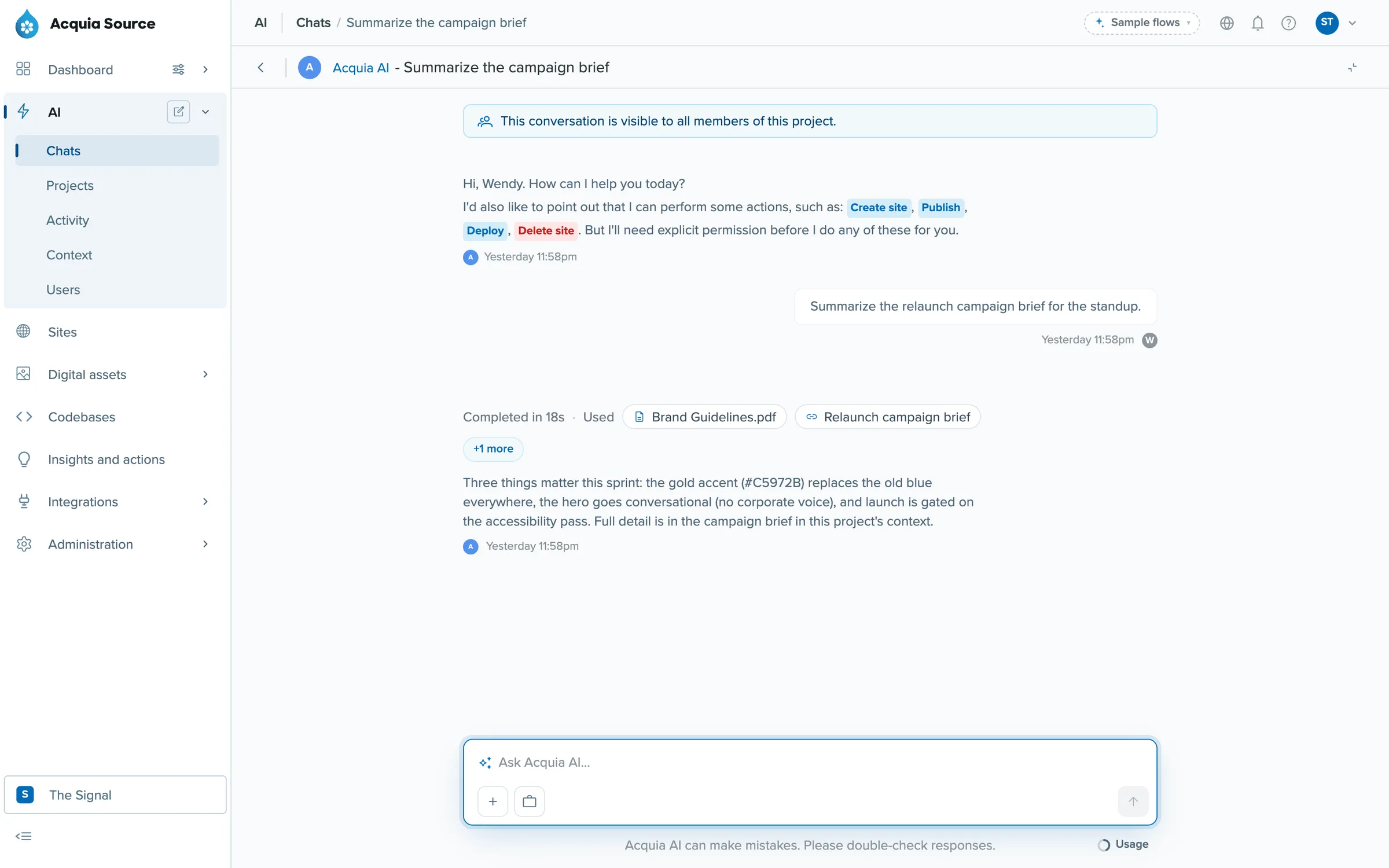 (opens full size in a new tab)
Acquia AI in the Source prototype, answering from the project's brand guidelines and campaign brief, and showing which sources it used.
The problem
Businesses want to hand work to AI, and Acquia's products hold the things that work touches: sites, content, assets and code. An assistant that can publish or delete across a company's sites is useful. It's also a liability if nobody can tell what it's allowed to do, or who asked it to do something.
Both versions of this product came back to the same two questions. What can the AI do? And how does a person stay in charge of it?
Part one: the standalone app
The first version of Acquia AI was a standalone app that framed AI as digital teammates. You'd ask for something like "check my Cloud applications for outdated modules and email me a ranked report every week", and it would hand the job to the AI teammate with the right tools. One, called Phil, was set up as a full-stack engineer with access to GitHub and Cloud. Another, Annie, was set up as a marketing specialist.
I joined as lead designer in August 2025. There was a prototype the developers had built and no design system. I built the design system, redesigned the product from the ground up, and UX researchers ran user testing with us to find out what worked and what didn't, which changed parts of our approach. Where the interface exposed a gap in the requirements, I pushed on them with product. I did design QA on everything engineering built until the MVP shipped in December 2025.
One idea carried straight into the version inside Source. When a teammate didn't have access to something, it said so and suggested who might, instead of trying anyway.
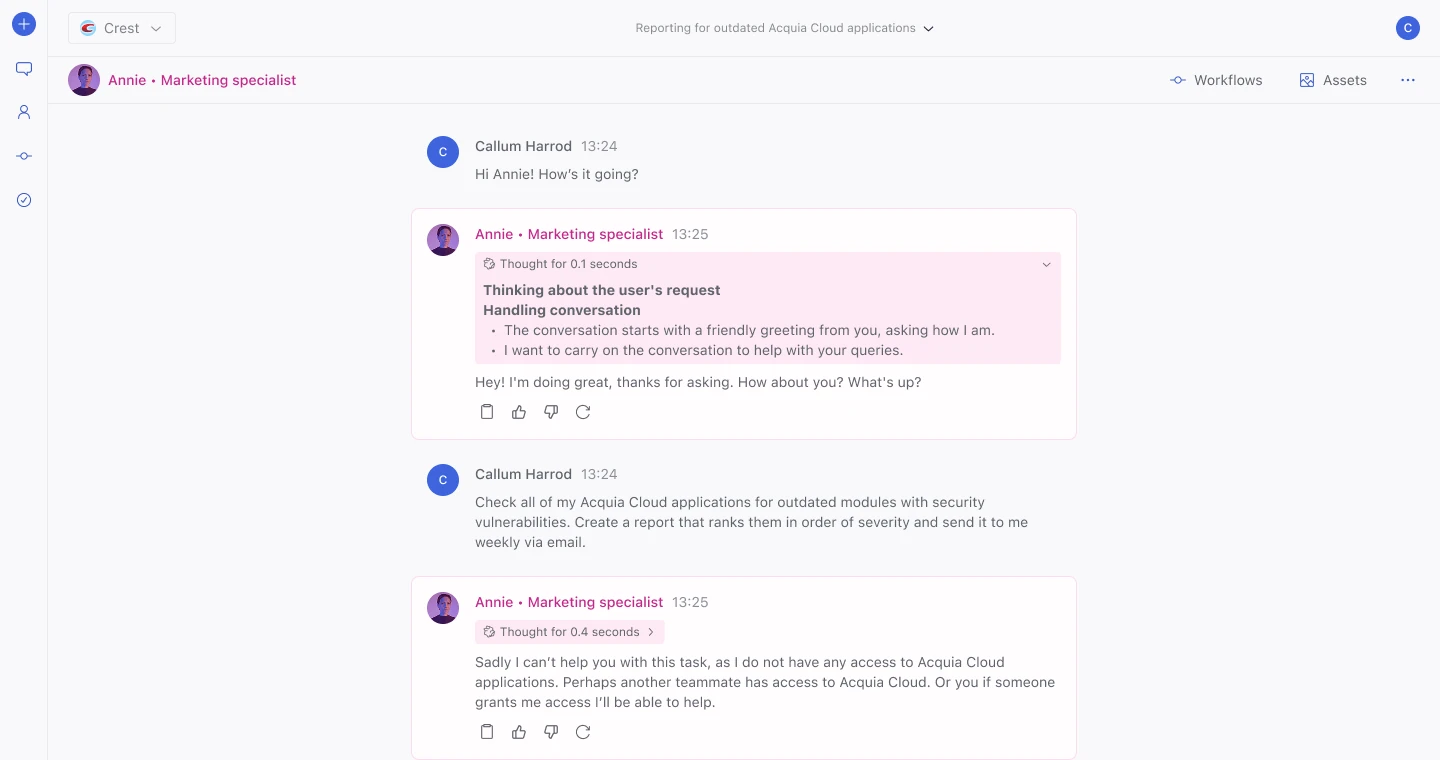
Asked for something she can't do, the marketing teammate says so and points elsewhere, instead of trying anyway.
Part two: inside Acquia Source
In 2026 the AI moved inside Acquia Source, so it could work across every product in the platform. From July I designed and built the AI area of the Source prototype: the composer on the dashboard, chats, projects, context, activity, users and agent access, and a first-run tour.
The Acquia AI team decided access would work through projects. There's no separate agent to choose: the project is the agent and holds the permissions, and anyone added to it can ask it to do anything those permissions allow. My job was to design the experience for that model. To do it well, I also worked through the alternatives, an agent that inherits the user's permissions, one locked to them, and one that acts as the user, to see what each would mean when a person and an agent can do different things. The rest of this page shows the project model.
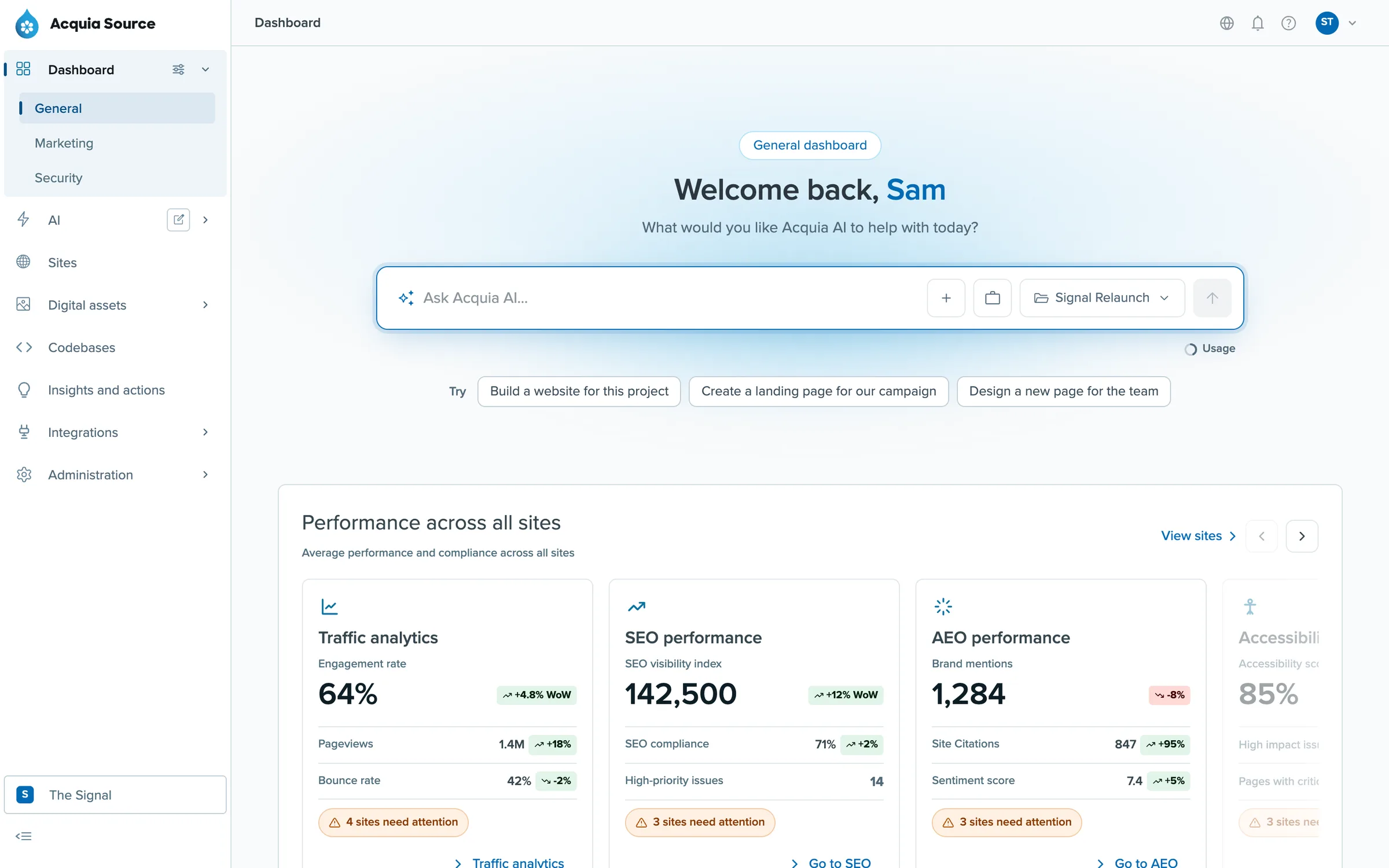
The composer on the Source dashboard. It knows which project you're working in and suggests things to ask.
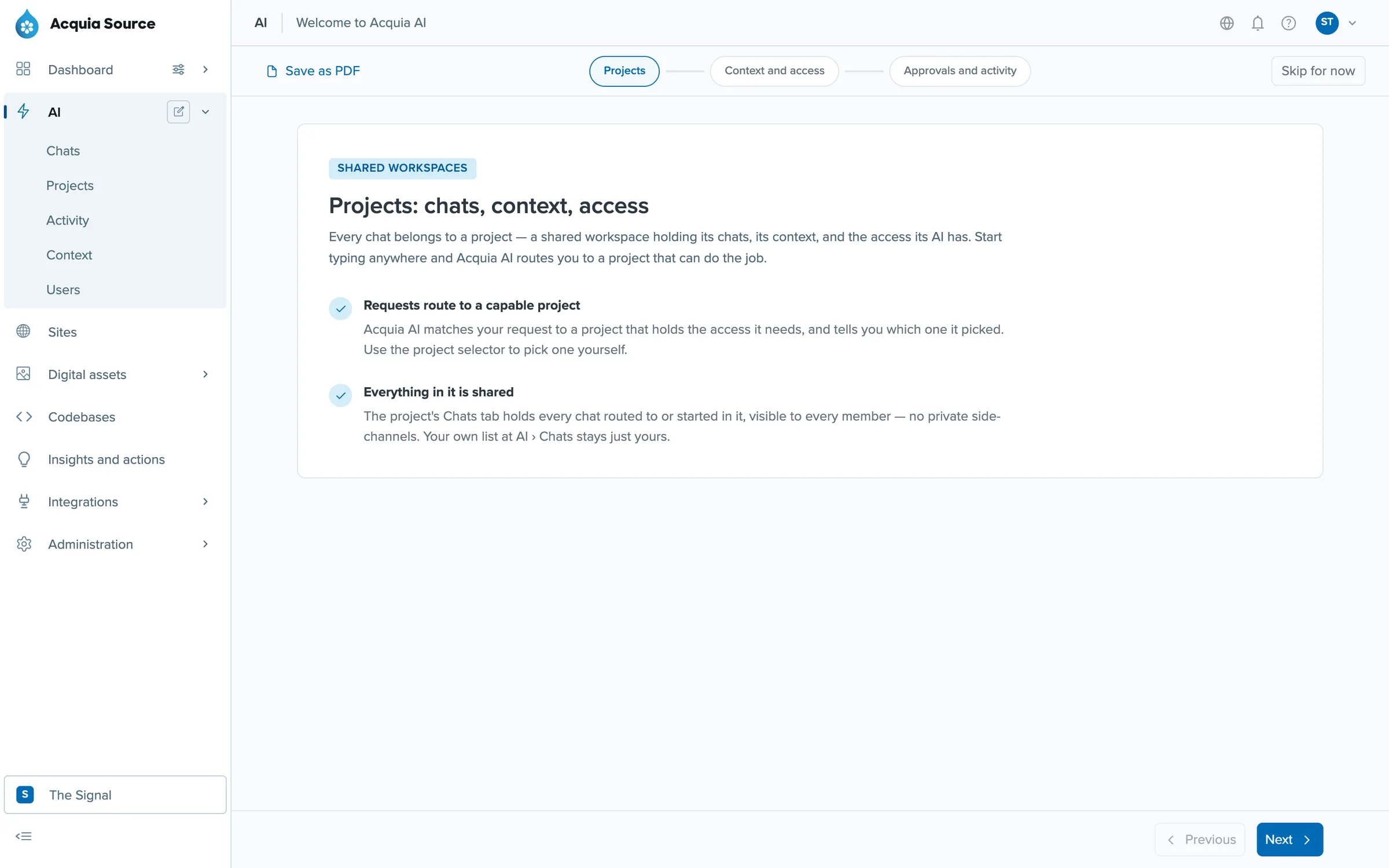
The first-run tour: projects, context and access, then approvals and activity. I built it with seven steps, and we cut it to three after a review.
Projects hold the context
A project is a shared workspace for a piece of work, like a relaunch or day-to-day publishing. It has members, chats and resources, and it acts as the agent: it holds the permissions, and any member can ask it to do anything those permissions allow. Every chat in a project is visible to its members. The top of each conversation says so, so nobody finds out later.
Context comes in four layers: the whole organisation, groups of shared material such as brand guidelines, the project, and whatever you attach to the message. Each answer lists the sources it used.
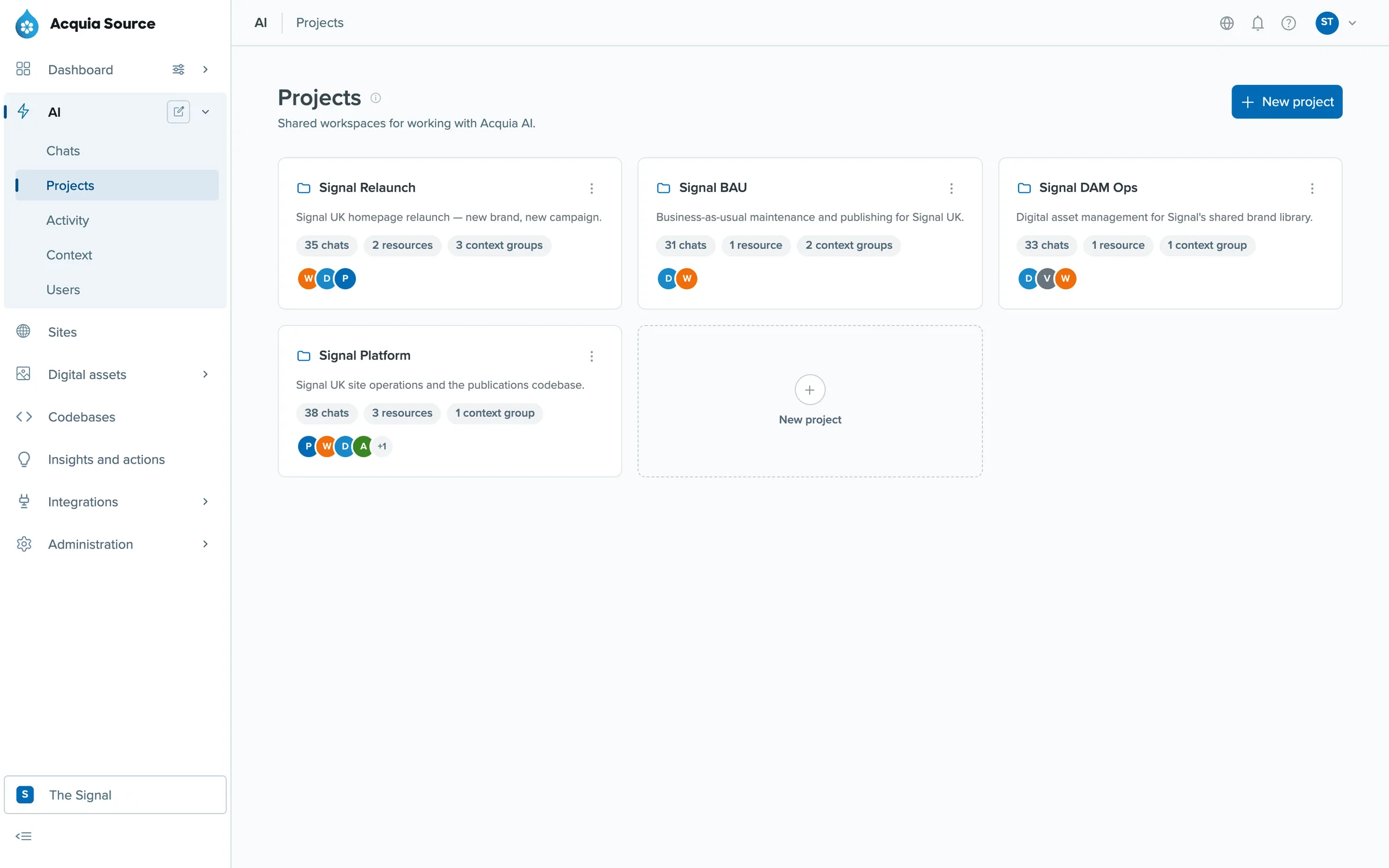
Projects, each with its chats, resources, context and members.
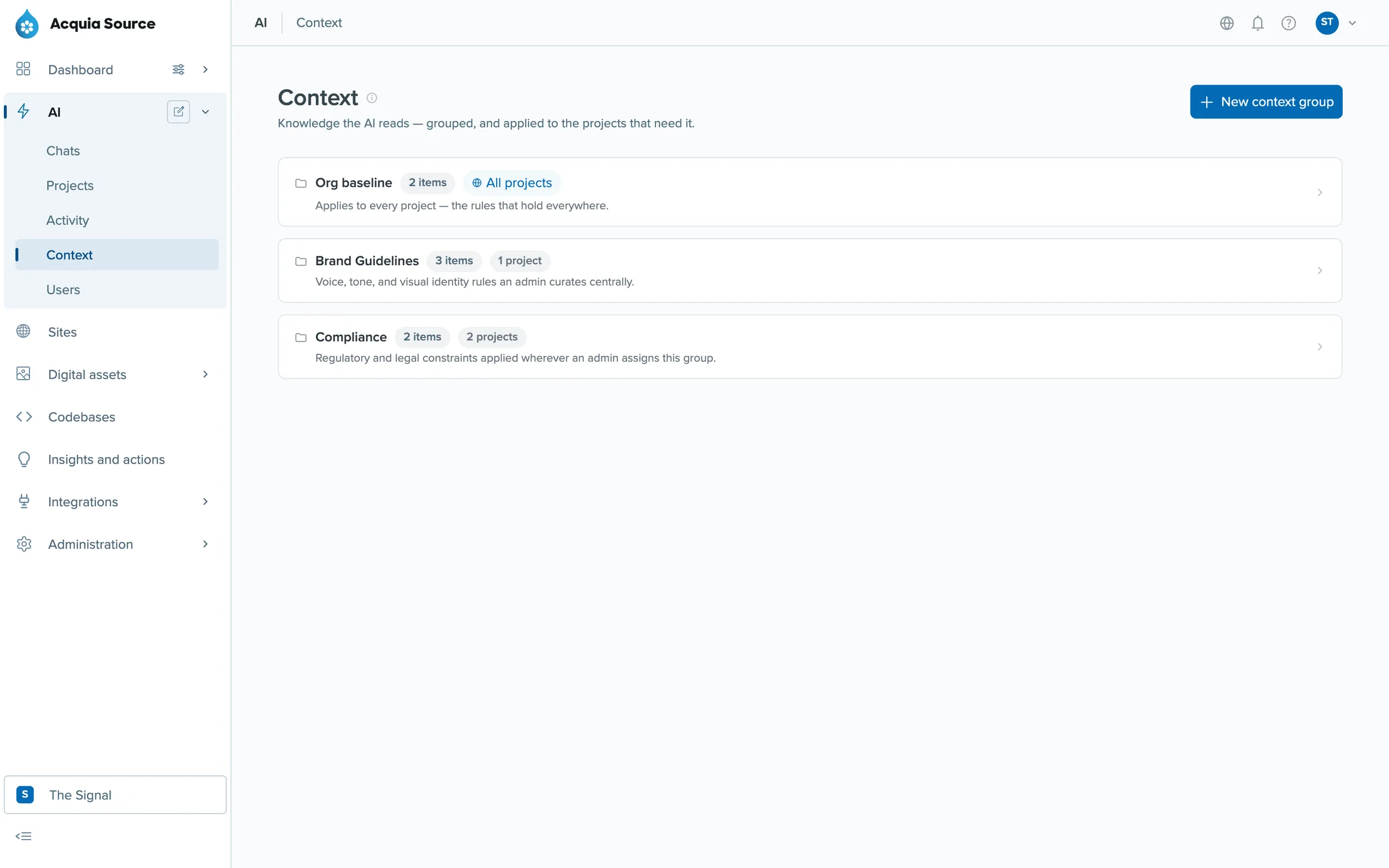
Context groups, applied to the projects that need them.
Agents only do what they're allowed to
A project's permissions are separate from the person asking. If a request needs something the project can't do, it declines, explains why, and points to where that permission could be granted or which project already has it. It never quietly escalates.
To make the permissions believable, I mapped the agent role onto Cloud Platform's real ones. Cloud has 79 permissions, and the agent role starts with 19. That mapping, and the rules for areas like digital assets, were settled in a review with product and engineering leads in September 2026.
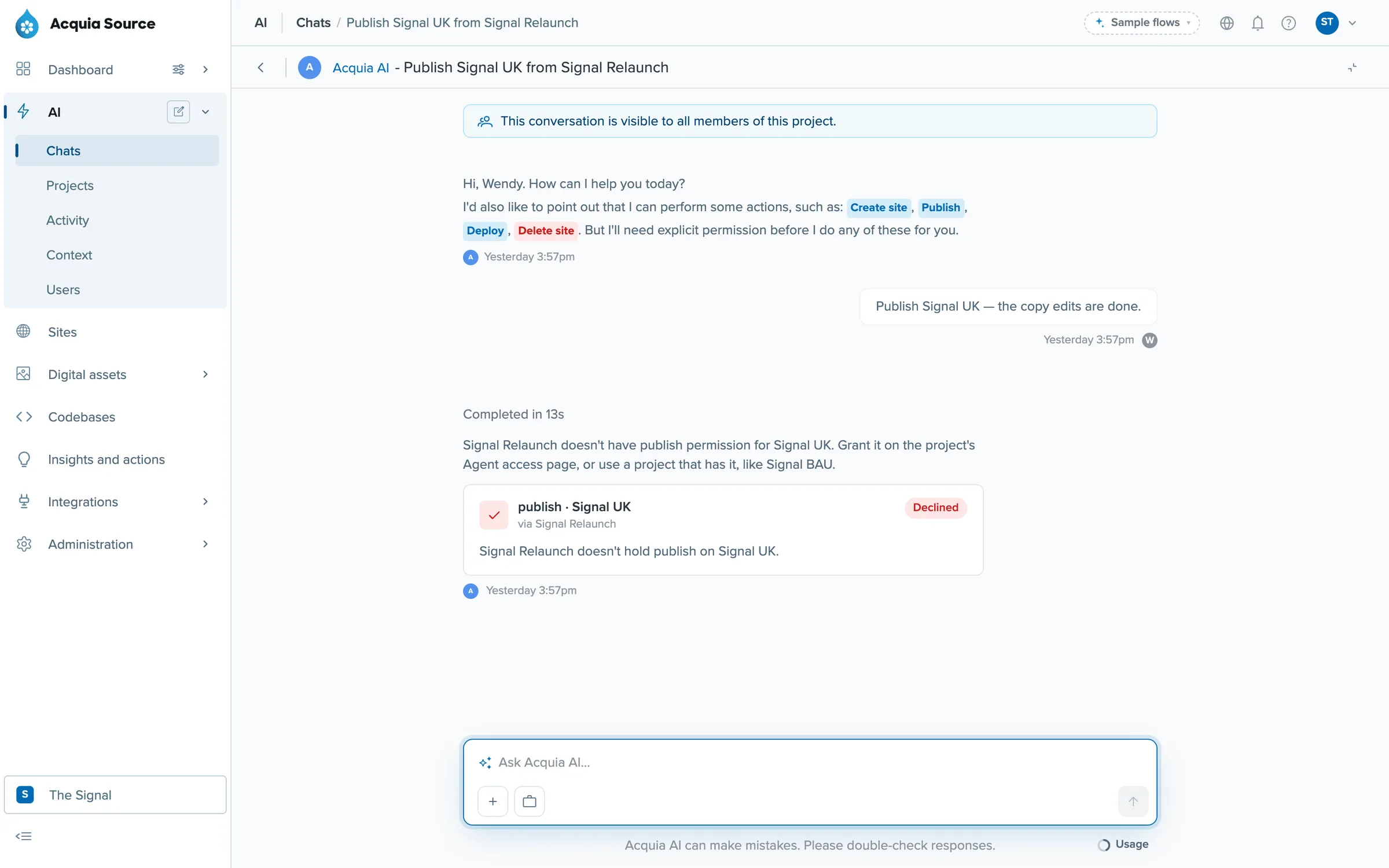
Asked to publish from the wrong project, the agent declines and tells you which project can do it.
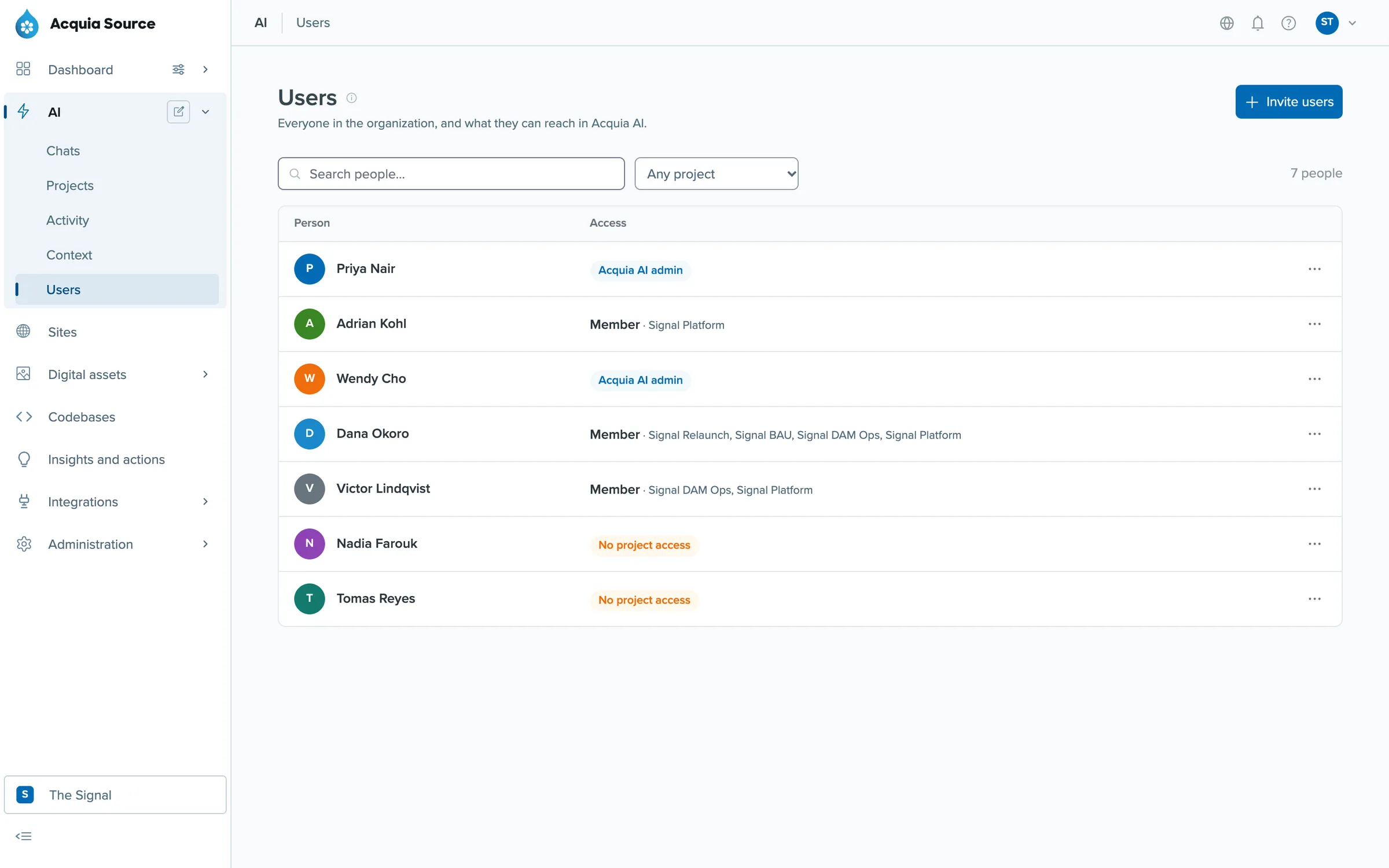
Who can reach what: admins, project members, and people with no project access.
Destructive actions always ask
If a project has permission for something destructive, like publishing, deploying or deleting, the agent will do it, but not straight away. When you ask for one of those actions, a confirmation appears above the chat box, saying what's about to happen and what it will change. Nothing happens until you approve or reject it.
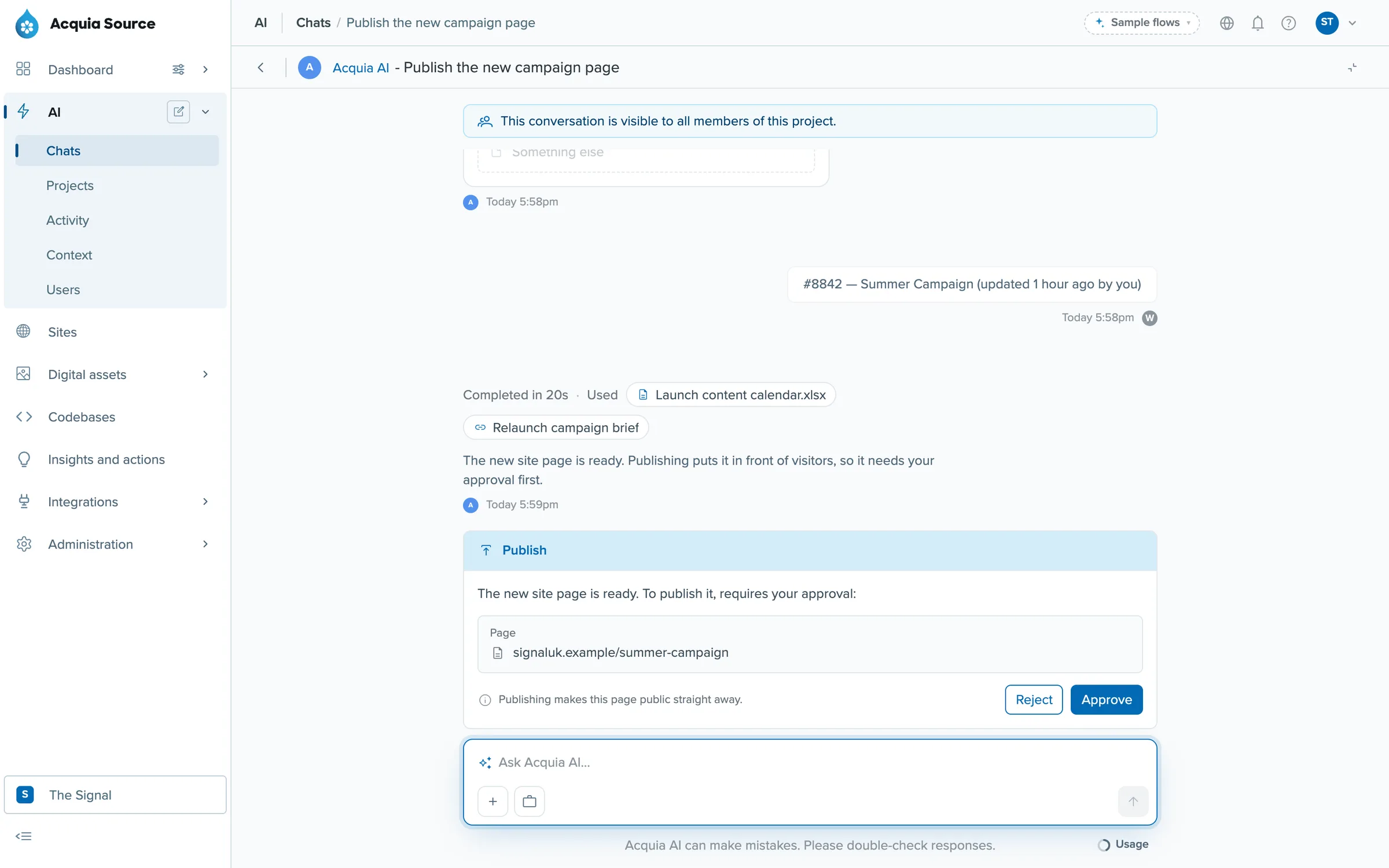
Publishing a new page waits for approval. Which actions stop for approval was my design. A colleague built the confirmation and the usage meter under the composer.
Admins can see everything
Org admins get an Activity page showing every AI action in every project, with filters and a link to each transcript. On their first visit a notice explains what's visible to them, and users are told that admins can review transcripts.
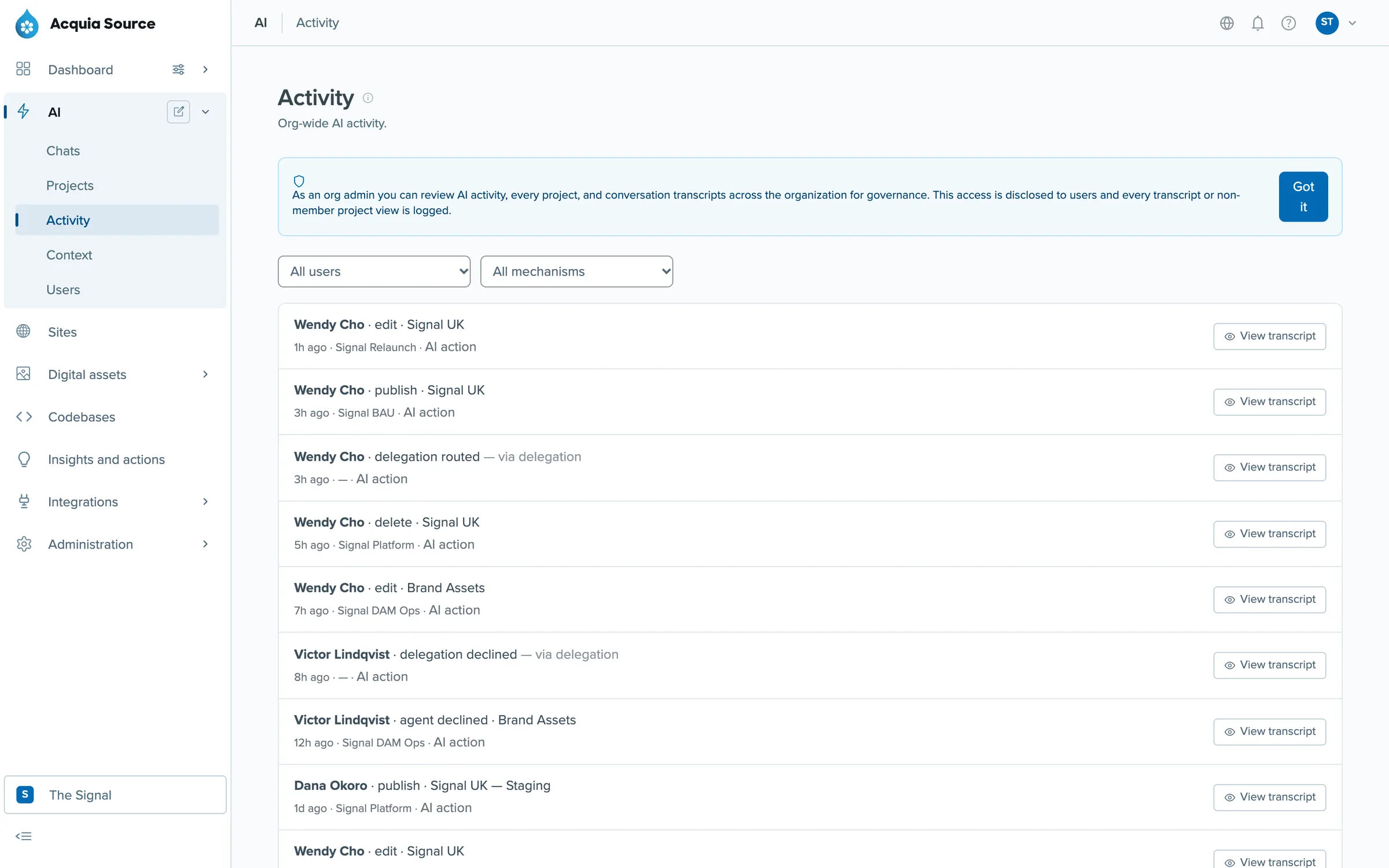
Activity: who did what, through which project, with the transcript one click away.
Results
- The first version's MVP shipped in December 2025, four months after I joined, and the standalone app is still running.
- Acquia AI is live inside Acquia Source, with all four parts of its model: projects, agent permissions, confirmed destructive actions and the admin activity page.
- The agent access rules were reviewed and agreed with product and engineering leads.